내장 함수 예

 input : 사용자 입력을 받는 함수

 import pickle

 import random  # 외장 함수

 language = input("무슨 언어를 좋아하세요?")

 print("{0}은 아주 좋은 언어입니다.".format(language))


 dir : 어떤 객체를 넘겨줬을 때 그 객체가 어떤 변수와 함수를 가지고 있는지 표시

 print(dir())

 print(dir())

 print(dir())


 print(dir(random))


 lst = [1, 2, 3]

 print(dir(lst))


name = "Jim"

print(dir(name))

- 밑에 사이트에서 내장 함수 참조 -

https://docs.python.org/3/library/functions.html


Built-in Functions — Python 3.8.4rc1 documentation

Built-in Functions The Python interpreter has a number of functions and types built into it that are always available. They are listed here in alphabetical order. abs(x) Return the absolute value of a number. The argument may be an integer or a floating po

docs.python.org


외장함수

 glob : 경로 내의 폴더 / 파일 목록 조회 (윈도우 dir)

 import glob

 print(glob.glob("*.py"))  # 확장자가 py 인 모든 파일


 os : 운영ㅊ제에서 제공하는 기본 기능

import os

 print(os.getcwd())  # 현재 디렉토리를 표시


 folder = "sample_dir"


 if os.path.exists(folder):

     print("이미 존재하는 폴더입니다.")

     os.rmdir(folder)

     print(folder, "폴더를 삭제하였습니다.")

 else:

     os.makedirs(folder)  # 폴더 생성

     print(folder, "폴더를 생성하였습니다.")

 print(os.listdir())

 import time  # 시간 관련 함수

 print(time.localtime())

 print(time.strftime("%Y-%m-%d %H:%M:%S"))


import datetime

 print("오늘 날짜는 ", datetime.date.today())


 timedelta : 두 날짜 사이의 간격

today = datetime.date.today()  # 오늘 날짜 저장

td = datetime.timedelta(days=100)  # 100일 저장

print("우리가 만난지 100일은", today + td)  # 오늘부터 100일 후


- 밑에 사이트에서 외장 함수 참조 -

https://docs.python.org/3/py-modindex.html


Python Module Index — Python 3.8.4rc1 documentation

numbers Numeric abstract base classes (Complex, Real, Integral, etc.).

docs.python.org


'Python' 카테고리의 다른 글

Python- pip install  (0) 2020.07.08
Python-패키지 사용법  (0) 2020.07.08
Python-모듈 사용법  (0) 2020.07.08
Python-init  (0) 2020.07.05
Python-class (스타크래프트 예시)  (0) 2020.07.05

https://pypi.org/


PyPI · The Python Package Index

The Python Package Index (PyPI) is a repository of software for the Python programming language.

pypi.org

위 사이트에서 자신이 필요로 하는 프레임워크를 검색 후에 사용하면된다.

ex) beautifulsoup을 python에서 사용할 때 예시

from bs4 import BeautifulSoup

soup = BeautifulSoup("<p>Some<b>bad<i>HTML")

print(soup.prettify())


pip list 현재 내PC에 설치된 프레임워크 확인
pip show 프레임워크이름 (프레임워크 정보를 볼 수 있다)
pip install --upgrade 프레임워크이름(새로나온 프레임워크로 업그레이드한다)
pip uninstall 프레임워크이름 (프레임워크 삭제)

'Python' 카테고리의 다른 글

Python-내장, 외장 함수  (0) 2020.07.08
Python-패키지 사용법  (0) 2020.07.08
Python-모듈 사용법  (0) 2020.07.08
Python-init  (0) 2020.07.05
Python-class (스타크래프트 예시)  (0) 2020.07.05

먼저,

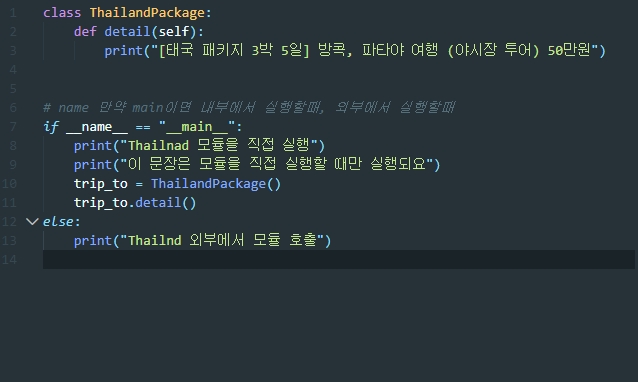
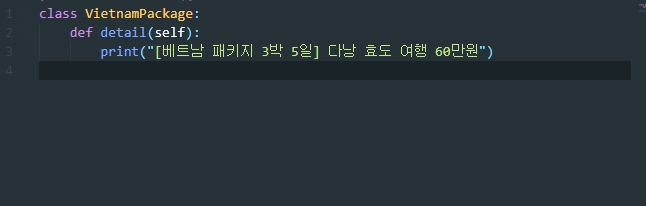
travel폴더 생성 후 thailand.py, vietnam.py, __init_.py 파일 생성


thailand.py


vietnam.py
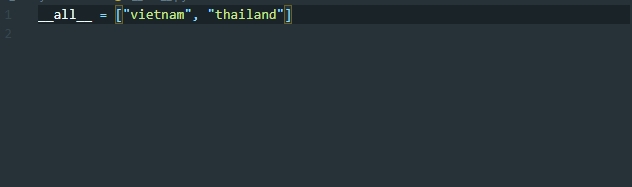
__init__.py


# import 뒤에는 모듈이나 패키지만 가능하다.

 import travel.thailand

 trip_to = travel.thailand.ThailandPackage()

 trip_to.detail()


# import로 클래스까지 선언하면 생략가능하다.

 from travel.thailand import ThailandPackage

 trip_to = ThailandPackage()

 trip_to.detail()


 from travel import vietnam

 trip_to = vietnam.VietnamPackage()

 trip_to.detail()


# __all__

# * 쓴다는 것은 travel 모든 패키지를 가져오겠다는 이야기인데 실제로는 개발자가 문법상에서 공개범위를 설정해야 한다.

from travel import *

# trip_to = vietnam.VietnamPackage()

trip_to = thailand.ThailandPackage()

trip_to.detail()


# 패키지,모듈 위치 확인

import inspect

import random

print(inspect.getfile(random))   # inspect.getfile을 통해 모듈 및 패키지의 폴더위치를 알 수 있다.

print(inspect.getfile(thailand))


'Python' 카테고리의 다른 글

Python-내장, 외장 함수  (0) 2020.07.08
Python- pip install  (0) 2020.07.08
Python-모듈 사용법  (0) 2020.07.08
Python-init  (0) 2020.07.05
Python-class (스타크래프트 예시)  (0) 2020.07.05

theater_module.py

# 일반 가격

def price(people):

    print("{0}명 가격은 {1}원 입니다.".format(people, people * 10000))


# 조조할인 가격

def price_morning(people):

    print("{0}명 조조 할인 가격은 {1}원 입니다.".format(people, people * 6000))


 # 군인 할인 가격

def price_soldier(people):

    print("{0}명 군인 가격은 {1}원 입니다.".format(people, people * 4000))

-------------------------------------------------------------------------------------------------------


module.py

import theater_module # 같은 패키지내에 있으면 해당 파일 명으로 모듈 호출

theater_module.price(3)  # 3명이서 영화 보러 갔을 때 가격

theater_module.price_morning(4)  # 4명이서 조조 할인 영화 보러 갔을 때

theater_module.price_soldier(5)  # 5명의 군인이 영화 보러 갔을 때


import theater_module as mv  # as 를 이용해 별명으로 간편하게 호출

mv.price(3)  # 3명이서 영화 보러 갔을 때 가격

mv.price_morning(4)  # 4명이서 조조 할인 영화 보러 갔을 때

mv.price_soldier(5)  # 5명의 군인이 영화 보러 갔을 때mv


from theater_module import * # * 호출시 함수명만으로 호출가능

price(3)

price_morning(4)

price_soldier(5)


from theater_module import price, price_morning # 일부모듈만 사용할 시

price(3)

price_morning(4)


from theater_module import price_soldier as price # 일부모듈만 사용할 시

price(3)


'Python' 카테고리의 다른 글

Python- pip install  (0) 2020.07.08
Python-패키지 사용법  (0) 2020.07.08
Python-init  (0) 2020.07.05
Python-class (스타크래프트 예시)  (0) 2020.07.05
Python-super  (0) 2020.07.05

+ Recent posts